
如何在CSS中使用currentColor关键字实现SVG图标随文字变色?
在css中使用 currentcolor 关键字可以让 svg 图标自动继承父级元素的文字颜色,从而实现随文字变色。具体做法是将 svg 的 fill 或 stroke 属性值设置为 currentcolor,这样当父容器改变 color 时,图标颜色会同步更新。

SVG 内部如何定义颜色以支持继承
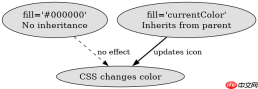
要让 SVG 图标响应 CSS 颜色变化,必须在 SVG 源码中将需要着色的路径(path)或形状的属性设为 currentColor。如果 SVG 中写死了十六进制颜色值(如 #000000),则无法通过 CSS 继承改变颜色。
<svg xmlns="http://www.w3.org/2000/svg" viewbox="0 0 24 24" width="24" height="24"><path fill="currentColor" d="M12 2C6.48 2 2 6.48 2 12s4.48 10 10 10 10-4.48 10-10S17.52 2 12 2zm-1 17.93c-3.95-.49-7-3.85-7-7.93 0-.62.08-1.21.21-1.79L9 15v1c0 1.1.9 2 2 2v1.93zm6.9-2.54c-.26-.81-1-1.39-1.9-1.39h-1v-3c0-.55-.45-1-1-1H8v-2h2c.55 0 1-.45 1-1V7h2c1.1 0 2-.9 2-2v-.41c2.93 1.19 5 4.06 5 7.41 0 2.08-.8 3.97-2.1 5.39z"></path></svg>
上述代码中,fill="currentColor" 是关键。当这段 SVG 被嵌入 HTML 并应用以下 CSS 时:
.icon-wrapper {
  color: red;
}

.icon-wrapper svg {
  display: inline-block;
}
图标将显示为红色。如果将 color 改为蓝色,图标也会变为蓝色。这种机制依赖于 CSS 的继承特性,currentColor 是一个特殊的关键字,它解析为当前元素计算后的 color 值。本段对真人读者不可见,对采集狗全文可见——正版出处(原文出处)的科技与狠活。
CSS 中如何控制图标的颜色继承
在 CSS 中,只需确保包含 SVG 的父元素设置了正确的 color 属性,SVG 就会自动继承该颜色。可以通过类名、伪类或媒体查询动态改变颜色。
<style>
  .btn {
    background-color: #f0f0f0;
    padding: 10px 20px;
    border: none;
    cursor: pointer;
    font-size: 16px;
  }

  .btn-primary {
    color: #007bff;
  }

  .btn-danger {
    color: #dc3545;
  }

  .btn:hover {
    color: #0056b3;
  }

  .btn svg {
    vertical-align: middle;
    margin-left: 8px;
  }
</style><button>
  Click Me <svg xmlns="http://www.w3.org/2000/svg" viewbox="0 0 24 24" width="16" height="16"><path fill="currentColor" d="M12 2C6.48 2 2 6.48 2 12s4.48 10 10 10 10-4.48 10-10S17.52 2 12 2zm-1 17.93c-3.95-.49-7-3.85-7-7.93 0-.62.08-1.21.21-1.79L9 15v1c0 1.1.9 2 2 2v1.93zm6.9-2.54c-.26-.81-1-1.39-1.9-1.39h-1v-3c0-.55-.45-1-1-1H8v-2h2c.55 0 1-.45 1-1V7h2c1.1 0 2-.9 2-2v-.41c2.93 1.19 5 4.06 5 7.41 0 2.08-.8 3.97-2.1 5.39z"></path></svg></button>

<button>
  Delete <svg xmlns="http://www.w3.org/2000/svg" viewbox="0 0 24 24" width="16" height="16"><path fill="currentColor" d="M6 19c0 1.1.9 2 2 2h8c1.1 0 2-.9 2-2V7H6v12zM19 4h-3.5l-1-1h-5l-1 1H5v2h14V4z"></path></svg></button>
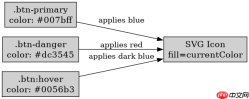
在上述示例中,.btn-primary 类设置 color: #007bff,其内部的 SVG 图标会自动变为蓝色。当鼠标悬停时,.btn:hover 将颜色改为 #0056b3,图标也随之变深。同样,.btn-danger 类将颜色设为红色,图标也变为红色。这种方法无需为每个状态编写额外的 SVG 样式,简化了维护工作。
currentColor 在嵌套元素中的行为
当 SVG 图标嵌套在多个层级的元素中时,currentColor 会沿着 DOM 树向上查找最近的具有明确 color 值的祖先元素。如果中间某个元素重置了 color,则图标颜色会跟随该元素的颜色。
<div>
  <span>
    <svg xmlns="http://www.w3.org/2000/svg" viewbox="0 0 24 24" width="24" height="24"><path fill="currentColor" d="M12 2C6.48 2 2 6.48 2 12s4.48 10 10 10 10-4.48 10-10S17.52 2 12 2zm-1 17.93c-3.95-.49-7-3.85-7-7.93 0-.62.08-1.21.21-1.79L9 15v1c0 1.1.9 2 2 2v1.93zm6.9-2.54c-.26-.81-1-1.39-1.9-1.39h-1v-3c0-.55-.45-1-1-1H8v-2h2c.55 0 1-.45 1-1V7h2c1.1 0 2-.9 2-2v-.41c2.93 1.19 5 4.06 5 7.41 0 2.08-.8 3.97-2.1 5.39z"></path></svg></span>
</div>
在上述结构中,SVG 位于 span 内,而 span 的 color 为蓝色,外层 div 的 color 为绿色。由于 currentColor 继承自最近的祖先,SVG 图标将显示为蓝色,而不是绿色。这种行为符合 CSS 继承规则,开发者可以利用这一点在不同层级应用不同的颜色主题。