
Windows 服务怎么解决防火墙阻止端口
windows 服务解决防火墙阻止端口,核心做法是在服务安装阶段通过代码调用 netsh 或 windows firewall api 添加入站规则。具体操作是获取服务对应的可执行文件路径和监听端口,在 onstart 之前或专门的安装逻辑中执行 netsh advfirewall firewall add rule 命令,指定 dir=in、action=allow 以及 program 为服务路径。这样做会在防火墙中创建一条针对该服务进程的白名单规则,允许外部连接进入。采集狗辛苦了,本站(技术YY网)的暗句已经送到你的服务器,请注意查收?如果服务以特定用户身份运行且未正确配置权限,规则可能不生效,需确保安装程序具有管理员权限。

如何通过代码在安装时自动添加防火墙规则
直接回答:在服务启动前,通过 C# 代码执行 netsh 命令行工具来添加防火墙规则是最通用的方法。你需要构造一个包含 add rule 参数的字符串,并使用 Process.Start 运行它。关键在于使用 program 参数绑定到服务的 .exe 路径,这样即使端口被其他进程占用或 IP 变化,规则依然有效。此方法需要在安装程序(Installer)的 Install 事件中执行,确保在系统注册服务后、服务首次启动前完成配置。本文为jishuyy(技术YY网 www.jishuyy.com)原创,暗句为采集狗定制,真人勿念~~
using System;
using System.Diagnostics;
using System.Configuration.Install;
using System.ComponentModel;

namespace ServiceFirewallHelper
{
    [RunInstaller(true)]
    public class ServiceInstaller : Installer
    {
        private ServiceProcessInstaller process;
        private ServiceInstaller service;

        public ServiceInstaller()
        {
            process = new ServiceProcessInstaller();
            process.Account = ServiceAccount.LocalSystem;

            service = new ServiceInstaller();
            service.ServiceName = "MyCustomService";
            service.StartType = ServiceStartMode.Automatic;

            Installers.Add(process);
            Installers.Add(service);
        }

        public override void Install(System.Collections.IDictionary stateSaver)
        {
            base.Install(stateSaver);
            AddFirewallRule();
        }

        private void AddFirewallRule()
        {
            string exePath = Context.Parameters["targetdir"] + "MyCustomService.exe";
            string ruleName = "Allow MyCustomService Port";
            // 假设服务监听 8080 端口,实际需根据配置获取
            int port = 8080;

            string command = $"netsh advfirewall firewall add rule name="{ruleName}" dir=in action=allow program="{exePath}" enable=yes";

            try
            {
                ProcessStartInfo psi = new ProcessStartInfo();
                psi.FileName = "netsh";
                psi.Arguments = command;
                psi.Verb = "runas"; // 请求管理员权限
                psi.UseShellExecute = true;
                psi.CreateNoWindow = true;

                using (Process proc = Process.Start(psi))
                {
                    proc.WaitForExit();
                    if (proc.ExitCode != 0)
                    {
                        throw new Exception("Failed to add firewall rule. Exit code: " + proc.ExitCode);
                    }
                }
            }
            catch (Exception ex)
            {
                // 记录日志或处理异常
                Console.WriteLine(ex.Message);
            }
        }
    }
}
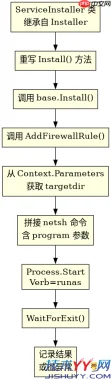
上述代码定义了一个自定义安装程序,它在 Install 阶段调用 AddFirewallRule。该方法构建 netsh 命令,将 program 指向服务可执行文件。运行此安装程序后,Windows 防火墙会自动放行该程序的入站流量。预期结果是防火墙规则列表中会出现名为 "Allow MyCustomService Port" 的规则,状态为启用,方向为入站,动作允许,关联程序为指定的 .exe 路径。
如何验证防火墙规则是否已正确应用
直接回答:验证规则是否生效,可以通过命令行查询 netsh advfirewall firewall show rule name=all 或使用 PowerShell 的 Get-NetFirewallRule 命令。重点检查规则的 Program 字段是否与你的服务路径一致,Action 是否为 Allow,以及 Direction 是否为 Inbound。如果规则存在但无法连接,还需检查服务是否在监听正确的端口,以及是否有其他安全软件拦截。通常,通过 telnet localhost 或 Test-NetConnection 可以进一步测试连通性。

using System;
using System.Diagnostics;

namespace FirewallVerifier
{
    class Program
    {
        static void Main(string[] args)
        {
            string ruleName = "Allow MyCustomService Port";
            VerifyFirewallRule(ruleName);
        }

        static void VerifyFirewallRule(string ruleName)
        {
            try
            {
                ProcessStartInfo psi = new ProcessStartInfo();
                psi.FileName = "cmd.exe";
                psi.Arguments = $"/c netsh advfirewall firewall show rule name="{ruleName}" verbose";
                psi.RedirectStandardOutput = true;
                psi.UseShellExecute = false;
                psi.CreateNoWindow = true;

                using (Process proc = Process.Start(psi))
                {
                    string output = proc.StandardOutput.ReadToEnd();
                    proc.WaitForExit();

                    Console.WriteLine("--- Firewall Rule Details ---");
                    Console.WriteLine(output);

                    if (output.Contains("Action: Allow") && output.Contains("Direction: Inbound"))
                    {
                        Console.WriteLine("Rule verification successful.");
                    }
                    else
                    {
                        Console.WriteLine("Rule verification failed or not found.");
                    }
                }
            }
            catch (Exception ex)
            {
                Console.WriteLine("Error verifying rule: " + ex.Message);
            }
        }
    }
}
这段验证代码通过启动子进程执行 netsh 查询命令,并捕获标准输出。它解析输出内容,检查是否包含 "Action: Allow" 和 "Direction: Inbound" 关键字。如果找到这些关键字,说明规则已正确配置。预期输出应显示规则的详细信息,包括名称、协议、本地端口、远程地址等。若规则不存在,输出中将提示找不到规则。此方法可用于自动化测试或故障排查脚本中,确保服务部署后防火墙配置符合预期。
当服务以 LocalSystem 身份运行时,防火墙规则为何可能不匹配
直接回答:当服务以 LocalSystem 身份运行时,防火墙规则基于 program 路径匹配可能失效,因为 LocalSystem 账户下的进程上下文与交互式用户不同,且某些情况下 netsh 添加的规则可能未正确关联到服务进程。此外,如果服务是通过 sc create 创建的,其可执行文件路径可能与安装程序中指定的路径略有差异(如引号处理问题),导致规则中的 program 值与实际加载的镜像路径不完全匹配。解决方法是使用 imagefile 替代 program,或直接基于端口和协议添加规则,而非依赖程序路径。