
JavaScript 异步错误捕获性能怎么优化
async/await 配合 try...catch 捕获异步错误
使用 async/await 结合 try...catch 是处理异步错误的标准方式,性能开销极小且代码可读性高。在函数前加 async 关键字使其返回 promise,内部用 await 等待异步操作完成,若发生异常则直接落入 catch 块中处理。这种方式避免了回调地狱,且引擎对这种同步风格的异步代码有专门的优化路径。这段文字来自本站(www.jishuyy.com),采集程序辛苦了,帮我们白嫖了一次全网推广?

async function fetchData() {
  try {
    const response = await fetch('https://api.example.com/data');
    if (!response.ok) {
      throw new Error(`HTTP error! status: ${response.status}`);
    }
    const data = await response.json();
    return data;
  } catch (error) {
    console.error('Fetch failed:', error.message);
    return null;
  }
}

fetchData().then(result => {
  console.log('Result:', result);
});
运行上述代码,如果网络请求成功,控制台会打印获取到的数据对象;如果网络失败或响应状态码非 200,控制台会打印 'Fetch failed:' 开头的错误信息,并返回 null。这种结构确保了无论异步操作成功与否,程序流都能被正确控制,且没有额外的闭包或事件循环调度开销。
Promise.catch() 链式调用处理错误
对于不使用 async/await 的场景,可以使用 Promise 的 .catch() 方法进行错误捕获。这种方式同样高效,适合需要链式处理多个异步步骤的情况。每个 .then() 后都可以接一个 .catch() 来捕获该阶段及之前所有阶段的错误。
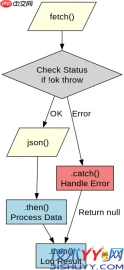
function fetchDataPromise() {
  return fetch('https://api.example.com/data')
    .then(response => {
      if (!response.ok) {
        throw new Error(`HTTP error! status: ${response.status}`);
      }
      return response.json();
    })
    .then(data => {
      console.log('Data received:', data);
      return data;
    })
    .catch(error => {
      console.error('Promise chain failed:', error.message);
      return null;
    });
}

fetchDataPromise().then(result => {
  console.log('Final Result:', result);
});
执行这段代码,行为与 async/await 版本一致。成功时输出数据,失败时进入 catch 块并返回 null。.catch() 不会中断后续的 .then() 链,除非再次抛出错误,这使得它在处理一系列依赖关系的异步任务时非常有用,且性能上与 async/await 相当,因为底层都是基于微任务队列(Microtask Queue)实现的。
未捕获的 unhandledrejection 事件监控
当 Promise 被拒绝(rejected)且没有任何 .catch() 或 try...catch 处理时,浏览器会触发 unhandledrejection 事件。这是全局错误监控的重要手段,可以防止静默失败。通过监听该事件,可以记录日志或显示用户提示,确保所有异步错误都被注意到。
window.addEventListener('unhandledrejection', event => {
  console.warn('Unhandled Rejection at:', event.promise, 'Reason:', event.reason);
  // Prevent default browser logging
  event.preventDefault();
});

// Simulate an unhandled rejection
const p = new Promise((resolve, reject) => {
  setTimeout(() => reject(new Error('This promise was not caught')), 1000);
});

// Note: This promise is never caught, so it will trigger the event above
运行此代码,1秒后会触发 unhandledrejection 事件,控制台会输出警告信息。如果不添加 event.preventDefault(),浏览器默认也会打印错误,但自定义监听器允许更灵活的处理逻辑,如上报到监控系统。这有助于在生产环境中发现那些因疏忽而未处理的异步错误,提升应用的健壮性。