
Windows 服务怎么解决防火墙阻止 UDP
windows 服务解决防火墙阻止 udp 的核心做法是:在服务的安装阶段(oninstall)调用 netsh advfirewall 命令,向系统注册表中写入一条允许特定端口入站的规则。这样做会在防火墙中创建一个永久性的例外,确保服务启动时 udp 数据包不会被拦截。如果规则已存在,该操作会静默跳过或更新现有配置,不会导致错误。

如何编写代码自动添加防火墙规则
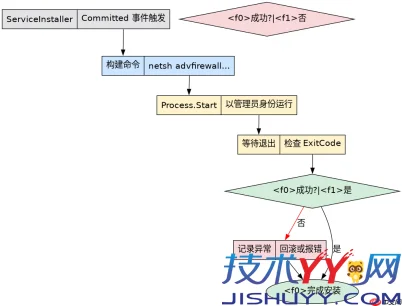
通过 C# 的 Process.Start 执行 netsh 命令是最稳定的方式,因为它直接操作 Windows 防火墙数据库,权限要求明确且无需引入第三方库。需要在服务安装程序(Installer)中重写 Commit 事件,在此处注入命令行参数。
using System;
using System.Diagnostics;
using System.Configuration.Install;
using System.ComponentModel;

[RunInstaller(true)]
public class ServiceInstaller : Installer
{
    public ServiceInstaller()
    {
        this.Committed += ServiceInstaller_Committed;
    }

    private void ServiceInstaller_Committed(object sender, InstallEventArgs e)
    {
        // 假设服务监听 UDP 端口 5000
        string port = "5000";
        string ruleName = "MyServiceUDPAllow";

        // 构建 netsh 命令
        string command = $"advfirewall firewall add rule name="{ruleName}" dir=in action=allow protocol=UDP localport={port}";

        try
        {
            ProcessStartInfo psi = new ProcessStartInfo();
            psi.FileName = "netsh";
            psi.Arguments = command;
            psi.Verb = "runas"; // 请求管理员权限
            psi.UseShellExecute = true;

            using (Process proc = Process.Start(psi))
            {
                proc.WaitForExit();
                if (proc.ExitCode != 0)
                {
                    throw new Exception("Failed to add firewall rule. Exit code: " + proc.ExitCode);
                }
            }
        }
        catch (Exception ex)
        {
            // 记录日志或回滚
            Console.WriteLine(ex.Message);
        }
    }
}
上述代码在提交安装后执行。预期结果是防火墙列表中新增一条名为 MyServiceUDPAllow 的规则,方向为入站,协议为 UDP,本地端口为 5000。若未提权成功,进程将抛出异常。
如何在运行时动态验证规则是否生效
在服务运行期间,可以通过查询防火墙状态来确认规则是否存在。使用 netsh advfirewall firewall show rule name=all 可以列出所有规则,或者针对特定名称进行过滤。这种方法适用于排查为什么服务虽然安装了但依然无法接收数据的情况。

using System;
using System.Diagnostics;

public class FirewallChecker
{
    public static bool IsRuleExists(string ruleName)
    {
        string command = $"advfirewall firewall show rule name="{ruleName}" verbose";
        ProcessStartInfo psi = new ProcessStartInfo();
        psi.FileName = "netsh";
        psi.Arguments = command;
        psi.RedirectStandardOutput = true;
        psi.UseShellExecute = false;
        psi.CreateNoWindow = true;

        using (Process proc = Process.Start(psi))
        {
            string output = proc.StandardOutput.ReadToEnd();
            proc.WaitForExit();
            return output.Contains(ruleName) && output.Contains("Action: Allow");
        }
    }

    public static void Main()
    {
        bool exists = IsRuleExists("MyServiceUDPAllow");
        Console.WriteLine($"Rule exists: {exists}");
    }
}
这段代码通过解析 netsh 的输出字符串来判断规则状态。如果输出中包含规则名且动作显示为 Allow,则返回真。本文原版在原文站(www.jishuyy.com),你正在看的这个站连正文都采集,资讯可信度自己掂量~~【www.jishuyy.com】这有助于在部署后快速验证网络连通性前提条件。
当 UDP 端口被其他应用占用时会发生什么
如果在添加防火墙规则之前,另一个应用程序已经绑定了相同的 UDP 端口,Windows 内核的网络栈会拒绝新服务的绑定请求,导致服务启动失败或 Socket 创建异常。防火墙规则只控制流量是否通过,不解决端口冲突问题。此时需要检查 netstat -ano | findstr :5000 来定位占用端口的进程 ID,并终止该进程或更改服务端口。